Showing posts with label Firewall. Show all posts

Thursday, 4 October 2012

EBOOK - Installation And Configuration of R.S.A enVision


"The Right Choice for Compliance and Security Success!". The RSA enVision platform provides collection, alerting and analysis of log data that enables organizations to simplify compliance and quickly respond to high-risk security events. The RSA enVision 3-in-1 platform offers an effective Security and Information Event Management (SIEM) and log management solution, capable of collecting and analyzing large amounts of data in real-time, from any event source and in computing environments of any size. RSA enVision is easily scalable - eliminating the need for filtering and to deploy agents.

Saturday, 30 June 2012

Types of Firewalls


Firewalls are everywhere today even many home network have firewalls today. But there are several different types of firewalls. You have hardware, software firewalls, stateful, stateless firewalls, proxy, application, desktop, dual-homed, reverse, etc

Some of which are explained below:

Sunday, 24 June 2012

CheckPoint Having Acceleration and Clustering Software Blade


The Check Point Acceleration and Clustering Software Blade delivers a set of advanced technologies, SecureXL and ClusterXL, that work together to maximize performance and security in high-performance environments. These work with CoreXL, which is included with the blade containers, to form the foundation of the Open Performance Architecture, which delivers throughput designed for data center applications and the high levels of security needed to protect against today’s application-level threats.

How to Configure a Cisco ASA 5510 Firewall – Basic Configuration Tutorial


This article gets back to the basics regarding Cisco ASA firewalls. I’m offering you here a basic configuration tutorial for the Cisco ASA 5510 security appliance. This device is the second model in the ASA series (ASA 5505, 5510, 5520 etc) and is fairly popular since is intended for small to medium enterprises. Like the smallest ASA 5505 model, the 5510 comes with two license options: The Base license and the Security Plus license. The second one (security plus) provides some performance and hardware enhancements over the base license, such as 130,000 Maximum firewall connections (instead of 50,000), 100 Maximum VLANs (instead of 50), Failover Redundancy, etc. Also, the security plus license enables two of the five firewall network ports to work as 10/100/1000 instead of only 10/100.

Next we will see a simple Internet Access scenario which will help us to understand the basic steps needed to setup an ASA 5510. Assume that we are assigned a static public IP address 100.100.100.1 from our ISP. Also, the internal LAN network belongs to subnet 192.168.10.0/24. Interface Ethernet0/0 will be connected to the outside (towards the ISP), and Ethernet0/1 will be connected to the Inside LAN switch. 

Friday, 22 June 2012

Check Point : SecurePlatform (SPLAT) Backup Options Available.


One aspect of the Check Point SecurePlatform OS that I struggle to get my head around is backups. There are a few different options, and during the course of researching an upgrade I came across the best explanation I’ve seen yet.  I’ve decided to grab a copy of the relevant text and post it in my blog for future reference here.

Oversimplified Executive Summary

  • upgrade_export contains just Check Point configuration
  • A backup is an upgrade_export plus SPLAT OS configuration
  • A snapshot is a backup plus binary files, both Check Point and SPLAT OS
  • As a general rule of thumb, if your restoring on the same hardware a snapshot would be the easiest to use since it contains the most info and an upgrade_export would be the worst, since you’d have to manually restore the most stuff.

Checkpoint : Mount USB Memory Stick / Pen Drive to Splat

Ever wanted to use an USB stick on OpenServer using SPLAT or an appliance?

Just connect the device to an USB port of your choice.

1. Load the appropriate kernel module for handling the USB device.
* modprobe usb-storage

2. Check which new device was bound, for example "/dev/sda1".
* fdisk -l

3. Create a mount point.
* mkdir /mnt/usbdisk

4. Mount USB device.
* mount /dev/sdb1 /mnt/usbdisk

5. Use the device to transfer data as you like.   "[DATA Transafer]"

6. Unmount USB device.
* umount /mnt/usbdisk


Tuesday, 19 June 2012

Top Ten Tips for Managing Your CheckPoint Firewall


This article discusses the Top ten tips that you can implement to best manage and fine tune your firewall. The purpose of this article is to get the best performance out of your firewall and increased security to your network.

1. Use the latest version of the OS software available for your particular firewall. Install the latest patches and if possible/applicable, the latest software version available.

2. Use a stealth Rule at the top of the rule base.

What is a stealth rule? A stealth rule is a rule which disallows any communication to the firewall itself from unauthorized networks/hosts. It is a rule to protect the firewall itself from attacks.

Monday, 18 June 2012

Different Types of Firewalls


Companies such as Cisco and other major vendors have introduced a multitude of firewall products that are capable of monitoring traffic using different techniques. Some of today's firewalls can inspect data packets up to Layer 4 (TCP layer). Others can inspect all layers (including the higher layers) and are referred to as deep packet firewalls. This section defines and explains these firewalls. 

The three types of inspection methodologies are as follows:
  • Packet Filtering and Stateless Filtering.
  • Stateful Filtering.
  • Deep Packet Layer Inspection.

Blue Coat ProxySG - CLI Commands


Here is a list of Blue Coat ProxySG CLI commands, that I have compiled from my studies, Blue Coat documents, and places around the web. This is by no means an exhaustive or comprehensive list, but is rather meant to be a command line KB of sorts - mainly for my quick reference. The list is split into standard and privileged mode commands. If the list proves useful to you, please feel free to share the link with others. Also, if you see any typo's with anything, feel free to let me know!

Checkpoint - Log File Corrupted


When log files get corrupted and we get the following error in the SmartView Tracker : "Failed to read record number" …
Note: "To repare the log file we need to know the log file name and then from the CLI on the CLM/CMA or from the Smartcenter "


Then use the following command :

[Expert@mlm]# fw repairlog


******************************************************************************************************
****************************************************************************************************** 

What Is SIC (Secure Internal Communication) in Checkpoint Firewall

SIC - Encryption, Authentication and Secure Channel

The following security measures are taken to ensure the safety of SIC:

Certificates for authentication.

Standards-based SSL for the creation of the secure channel.

3DES for encryption.


******************************************************************************************************
****************************************************************************************************** 

Checkpoint Firewall Logs from CLI

Syntax
fw log displays the content of log files.

The full syntax of the fw log command is as follows:

fw log [-f [-t]] [-n] [-l] [-o] [-c action] [-h host] [-s starttime] [-e endtime] [-b starttime endtime] [-u unification_scheme_file] [-m unification_mode(initial|semi|raw)] [-a] [-k (alert_name|all)] [-g] [logfile]

Saturday, 16 June 2012

How to Configure DHCP on Cisco Router 871 or 18xx or 21xx or 26xx .(Series)


DHCP stands for Dynamic Host Configuration Protocol. Basically it’s a mechanism which assigns IP addresses to computers dynamically. Usually DHCP is a service running on a server machine in the network in order to assign dynamic IP addresses to hosts. All Cisco 800 series models have the ability to work as DHCP servers, thus assigning addresses to the internal LAN hosts. Without a DHCP server in the network, you would have to assign IP addresses manually to each host. These manually assigned addresses are also called “static IP addresses”.

Friday, 15 June 2012

The PING of Death and Other DoS Network Attacks


What is known as Denial-of-Service (DoS) Attacks.?? Do You Prevent it or Not.? This Question Is Very Difficult.!!
I’m very disappointed to admit that in our days this type of attack is one of the most common attacks found in the network community. The intention of the attacker in this case is to stress the victim with a tremendous amount of spurious traffic so that the network has no more free resources to process normal legitimate traffic.
Learning about these types of network attacks — learning your enemy — will help you be prepared for the worst. Once you understand your enemy’s behavior and the different types of network threats we’ll move on to specific solutions and how to protect your network.

DoS Attacks - Denial-of-Service Attack

Denial of Service Attacks can take many forms. The most important ones are:
  • SYN Flood
  • UDP Flood
  • ICMP Flood
  • Land Attack
  • Teardrop Attack
All these attacks have one thing in common which is nothing else than making their victim unable to serve legitimate traffic by filling up its session table with malicious connection attempts.

Check Point Authentication Methods


Authentication feature of checkpoint ensures the users trying to access resources in your network are actually authorized to do so.With this feature instead of simply allowing a client access a device, the administrator can request the client to authenticate first before permitting access..................

Checkpoint supports the following three types of authentication methods:
1.Checkpoint User Authentication.
2.Checkpoint Client Authentication.
3.Checkpoint Session Authentication.

1.Checkpoint User Authentication:
In this type of authentication, for every traffic that passes through the firewall, the client user needs to first authenticate.This ensures that only valid authenticated users only are able to access the destination resources. The limitation is user authentication only supports Telnet, HTTP, FTP and RLOGIN attempts.


Checkpoint : Nokia Hardware - Model - Serial Number

Check Nokia Hardware Model Number with Serial Number
FW [Admin]# cat /var/etc/.nvram
---------------------------------------------------------------------
Vendor Nokia
Chassis serialnum: 88064000318
Model IP560
---------------------------------------------------------------------
FW [Admin]#


How to Configure Cisco VTP – VLAN Trunk Protocol


In a previous post I explained how to configure VLANs on Cisco Switches. That was a simple scenario with just two switches connected with a trunk port and having shared VLANs belonging to both switches. Now, imagine the situation where you need to manage a huge Layer 2 switched network with tens or hundreds of switches and with VLANs spread across all switches in the network. This would be a daunting task for any network administrator as he would have to connect on all switches and add or remove VLANs accordingly every time a new vlan is required in the network.

Thursday, 14 June 2012

List Of Checkpoint Ports - Port Used In CheckPoint


TCP Port 256 is used for three important things:
  • Exchange of CA and DH keys in FWZ and SKIP encryption between two FireWall-1 Management Consoles
  • SecuRemote build 4005 and earlier uses this port to fetch the network topology and encryption keys from a FireWall-1 Management Console
  • When instaling a policy, the management console uses this port to push the policy to the remote firewall.
TCP Port 257 (FW1_log) is used for logging purposes.

Checkpoint : SPLAT - Disable CD/DVD Rom | Disable CD/DVD Rom From SPLAT (Checkpoint Secure-Platform)


How to disable the "CD/DVD ROM" from "CLI"


FW [Admin]# cd /lib/modules/2.6.18-92cp/kernel/drivers/cdrom

FW [Admin]# mv cdrom.ko cdrom.ko.orig

FW [Admin]# Reboot

or

FW [Admin]# modprobe -r sr_mod

******************************************************************************************************
****************************************************************************************************** 

Wednesday, 13 June 2012

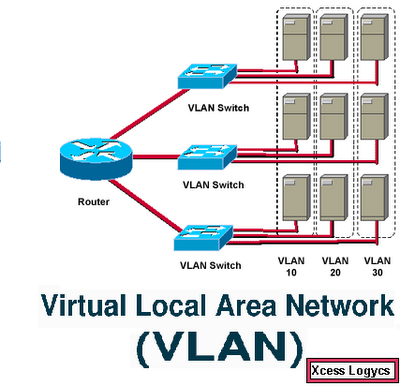
How to Configure VLANs on a Cisco Switch (All Series)


This post will deal with configuring Layer 2 VLANs on Cisco switches. Up to 4094 VLANs can be configured on Cisco catalyst switches. By default, only VLAN 1 is configured on the switch, so if you connect hosts on an out-of-the-box switch they all belong to the same Layer 2 broadcast domain.
The need to configure several Layer 2 VLANs on a switch arises from the need to segment an internal Local Area Network (LAN) into different IP subnetworks. If you want for example to separate the different departments of your enterprise into different IP subnetworks, then each department should belong to its own Layer 2 VLAN.